Agent states
What working, needs you, idle, exited and asleep mean on an agent's tile, and how Hivemind knows.
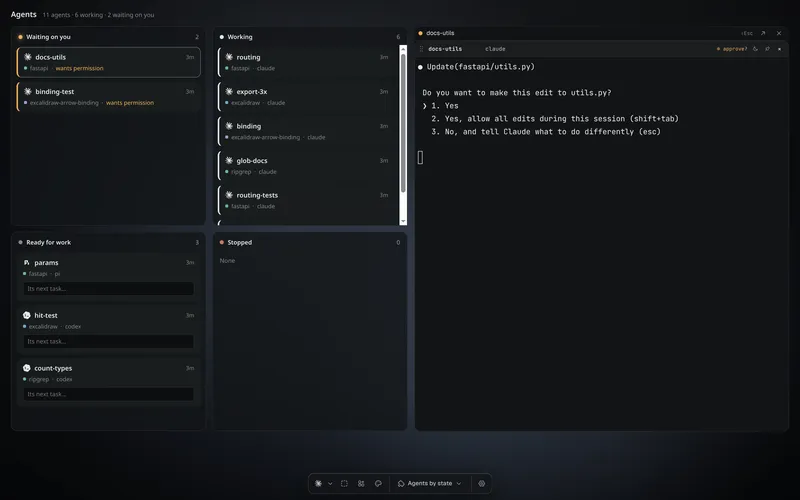
Every agent's tile shows one state: what the agent is doing, and whether it waits on you. The same state shows on its row in the Layers panel, its frame, and in your notifications.
Paste this into your coding agent to get a summary of what each agent is doing right now.
Show the prompt
Tell me what each of my Hivemind agents is doing right now. Do not change anything.

1. Run `hive ctl agents --json`. If it exits 3, tell me Hivemind is not open on this project and stop.
2. Group the agents by state: needs you first, then working, then idle, then exited and asleep.
3. For each agent that needs me, say what it is waiting on, in one line.
4. Suggest which one I should answer first, and why.

REFERENCE https://hivemind.griiken.com/guide/agent-states.md
The states
| State | Colour | Means |
|---|---|---|
| working | white | busy on its task |
| needs you | amber | waiting for a person: a permission question or a question with options |
| blocked | amber | waiting on a person for another reason |
| review? | amber | waiting for you to approve its plan |
| approval? | amber | a supervised worker, waiting for its lead to approve a tool. Its lead answers, so the app does not tell you |
| idle | grey | at its prompt, ready for a task |
| exited | grey, red if it failed | its program has stopped |
| asleep | — | put to sleep: its program stopped, its conversation kept, with Resume |
A dot on a row means the agent finished since you last looked. Mark as read in the row's ⋮ menu clears it.
Amber always means a person is being waited on. When a frame is collapsed, its dot shows the most urgent state inside it, so needs you wins.
- Start → idle.
- idle → working: a turn starts. working → idle: the turn ends, and a dot shows until you look.
- working → needs you: it asks you. needs you → working: you answer.
- idle → asleep: Sleep. asleep → idle: Resume.
- Any state → exited: its program stops.
How it works
- Hooks → background process: the agent tells Hivemind when it starts working, stops to ask, or finishes replying. Exact and immediate.
- Screen rules → background process: for an agent that sends nothing, rules in its agent file read its screen for its prompt, its questions and its spinner.
- The screen decides until the agent's first hook arrives. From then on, the hooks do.
- Background process → everywhere it shows: the tile, the Layers panel, notifications and your phone.
- The computer that runs an agent works out its state. Other devices show what it says.
Which of the two an agent uses is in its agent file. See Add your own agent.
Why it works this way
An agent's own messages are the only exact source, but not every agent sends them. Reading the screen covers the rest, so every agent shows a state. Only agents that tell Hivemind when they finish replying can work for another agent: the lead needs to know when a reply is complete.
What to do with it
- Know who is waiting: the bell, notifications and push.
- Run agents: sleep and resume.
- Coordinate agents: which agents can be workers.
Last validated for Hivemind 2026.10.3.