Write a view
Build your own way of drawing the workspace: a small web page that lists, groups or charts your agents.
Build a viewA way of drawing the workspace: Canvas, Windows, or one you install.Glossary → that lists every tile with a dot for its status, then change it. It takes about fifteen minutes.
Paste this into your coding agent to build a view, switch Hivemind to it and publish it.
Show the prompt
Build a Hivemind view (a sandboxed web page that draws the whole workspace its own way) and, if I want, publish it on HiveHub.

1. Ask me what the view should show and do, and its name (lowercase letters, digits and dashes).
2. Start it: `hive plugins new view <name>`. It takes the owner from the GitHub account `gh` is signed in as. If `gh` is not signed in, ask me for my GitHub login and pass `--owner <login>`. Then run `npm install` in the new folder (it needs Node).
3. Read `PROMPT.md` in full: it is the whole contract (the SDK, permissions, the sandbox). Write what I asked for under its "What I want", and build only from it. The view has no network, reads only its own files and has no `window.hive`. It uses `@hivemind/view-sdk`, which the app serves, so do not bundle it.
4. Check it, then build and install it, again after each change: `hive plugins check .` must say ok (it names the file and line of each problem), then `npm run dev`. Check it prints "installed @owner/name".
5. Show it: `hive ctl plugin open view:@owner/name`. If `hive plugins list` shows it off, run `hive plugins enable view:@owner/name` first.
6. Declare one command in `hivemind-view.json` under "commands", answered with `hm.onCommand`, that reports what the view shows. Check it with `hive ctl plugin call @owner/name <command>`.
7. Done means: `hive plugins list` shows it on with no problem, it follows the light and the dark theme (`applyThemeVars`), the manifest has a one-line description, a "category" and only the permissions it uses, and `README.md` says what it does.
8. Publish only if I say so. Commit `dist/` with the source, because HiveHub publishes the pushed commit. Follow the "Publish a plugin" page (https://hivemind.griiken.com/guide/publish-to-hivehub.md) and run `hivehub publish dist`. If I must sign in, ask me to open the link and type the code myself.

At the end, tell me the view's id, the command others use to install it (`hive plugins install @owner/name`), and anything you could not check.

REFERENCE https://hivemind.griiken.com/guide/extension-authoring.md
Views others have built
Each is on HiveHub as @dip497/<name>.
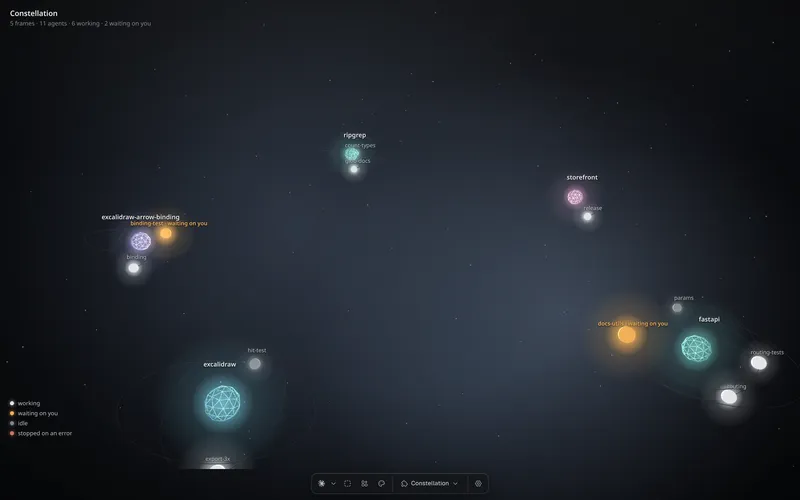 constellationYour agents as stars, grouped by project.
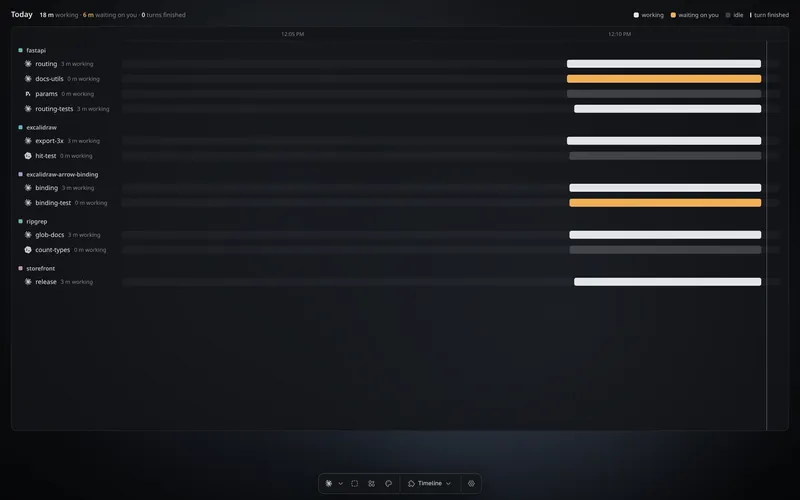 timelineToday's work, one row per agent.
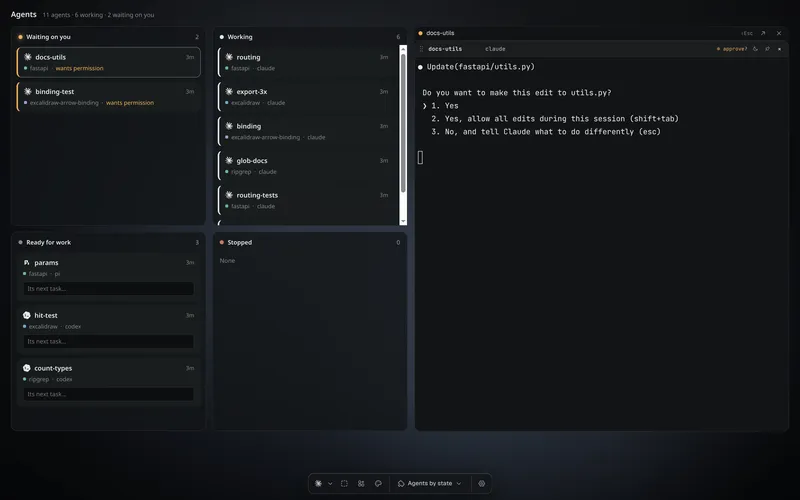 agents-by-stateA board with one column per state.
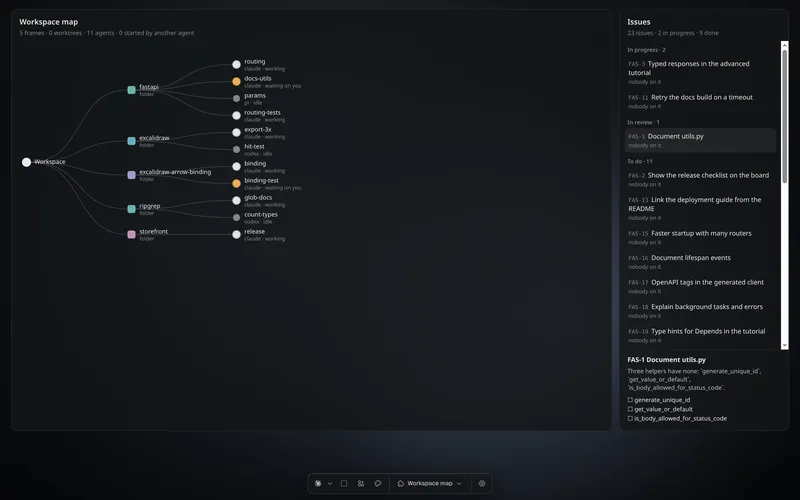 workspace-mapFrames, worktrees, agents and issues on one map.
What you'll learn
- How to start a view from the starter and switch the window to it.
- How a view hears the workspace change and shows each agent's status.
- How to rebuild it and see the change.
Before you start
- Hivemind is installed and open on a project with a few tiles. See Install and run your first agent.
- Node 22 or newer, for
npm. - You know a little TypeScript or JavaScript.
Start the view
hive plugins new view pulseCheck: it prints created @<your login>/pulse. If it asks for an owner, add
--owner <your GitHub login>.
pulse/
  hivemind-view.json   the view's name, id, version and permissions
  index.html           the page, which loads ./main.js
  src/main.ts          your code
  PROMPT.md            the whole contract, for a coding agent
  dist/                what you install and publish, once built
Build and install it
cd pulse && npm install
npm run dev
Check: the last line says installed @<your login>/pulse. npm run dev builds dist/ and
installs it in one go.
Switch to it
Open the view menu in the toolbar (it shows Canvas) and pick Pulse.
Check: the window shows Pulse and one row per tile, each with a dot for its status. Press a row and Hivemind selects that tile.
Read the code
src/main.ts connects, follows your theme, and redraws when tiles change:
import { applyThemeVars, connect, statusTone } from "@hivemind/view-sdk";

const hm = await connect();
applyThemeVars(hm);

const list = document.querySelector("ul")!;
let unsubscribe: (() => void)[] = [];

hm.on("structure", ({ tiles }) => {
  for (const off of unsubscribe) off();
  list.replaceChildren();
  unsubscribe = tiles.map((tile) => {
    const dot = Object.assign(document.createElement("span"), { className: "dot" });
    const button = document.createElement("button");
    button.append(dot, tile.name);
    button.onclick = () => hm.commands.selectTile(tile.id);
    const item = document.createElement("li");
    item.append(button);
    list.append(item);
    return hm.subscribeStatus(tile.id, (s) => { dot.dataset.tone = statusTone(s); });
  });
});
structure comes again whenever frames or tiles change. The app serves @hivemind/view-sdk
to every view, so your bundle leaves it out. To draw a state the way the app does, a shape
per state in its colour (only "needs you" pulses), put statusMarkSvg(statusTone(s)) in the row
instead of the dot; STATUS_MARKS holds each state's word and shape.
Change it
Add this line inside the structure handler, after list.replaceChildren();:
document.querySelector("h1")!.textContent = `${tiles.length} tiles`;Run npm run dev again.
Check: the heading now counts your tiles. Open a terminal and the count goes up.
What you did
- You started a view with
hive plugins new viewand installed it withnpm run dev. - You switched the window to it from the toolbar's view menu.
- You read the workspace with
hm.on("structure")and each agent's status withhm.subscribeStatus.
Next
- Want an agent to build the rest? Write your idea at the top of
PROMPT.mdand hand it the file. - Share it: Publish a plugin on HiveHub.
- Ship it with your other tools, widgets and views as one: Packages.
- A real example with a saved layout and agent commands:
views/agent-board. - Something wrong? See Troubleshooting.
View reference
What a view can use
Check hm.supports("<feature>") before using a newer feature.
| Need | Call |
|---|---|
| Put live terminals in your layout | hm.setSurfaceRects(...) (surfaces) |
| Show what a tile last said, or what its agent waits on, with Review | hm.setLineRects([{ tileId, x, y, w, h }]) (lineSlots): the app draws it in the room you leave, at least 20px high, and its own Review for a permission (never Allow in your room); your view never gets the text |
| Save your layout (64 KB, per workspace) | hm.setLayout(blob) |
| An agent's status as it changes | hm.subscribeStatus(tileId, (status, info) => …) |
Show a tile when someone asks to see it: a widget's button, a notification's View, hive ctl focus | hm.onReveal((tileId) => …): move your camera to it and answer where it is drawn ({ x, y, w, h }), or null for a tile you do not draw |
| What happens: replies, waits, closes | hm.onEvents(["turn", "needsInput"], cb) |
| How busy a terminal is (0 to 3) | hm.activity(tileId, cb) |
| A day's history per tile | await hm.history("2026-09-23") |
| Installed agents, past sessions | await hm.agents(), await hm.sessions("claude", frameId) |
| Start an agent | hm.commands.spawnAgent(agent, frameId, { prompt, resume }) |
| Suggest a prompt (the person confirms) | await hm.prompt(tileId, "run the tests") |
| Who else is here | hm.onParticipants(cb) (participants) |
| The canvas's widgets | hm.onWidgets(cb), hm.pressWidget(id, action) (widgets) |
| Keep clear of the widget cards over your view | hm.onWidgetBand(({ edge, width }) => …) (widgetBand): how far the cards reach in from your widget edge, the gap beside them included, or 0 when there are none. It comes at once, then each time cards come or go, start a second column, or the window is resized |
| Issues | hm.onIssues(cb), hm.issues.read(id), create, update, … (issues) |
| Its settings | hm.settings, hm.on("settings", cb) (settings) |
| Draw your own toolbar | "toolbar": "off", then hm.commands.openHostMenu("views", rect), "add", "appearance" or "settings" opens the app's own (hostMenu) |
| Messages from your scripts | hm.onCustom("ci.*", cb), sent by hive ctl view emit ci.build '{…}' |
Each tile in structure carries its icon (an SVG in currentColor) and its agent. Each frame
carries its folder, branch, parentId (a worktree under its project) and machine when it
runs on another computer.
A view never reads an agent's replies or terminal text, and never answers its permission questions. Every prompt a view writes opens a dialog showing the full text, with Cancel focused.
Colours
applyThemeVars(hm) sets the app's theme on your page as CSS variables, and again each time it
changes. 15 colours come from the app and the phone page, each as --hm-color-<name>; what each
is for is in the app's colours. A release that removes or
renames one says so with Breaking: in the CHANGELOG. A colour added later reaches only newer
apps, so give it a fallback: var(--hm-color-new, #888).
Permissions
A view declares its permissions in hivemind-view.json. An unknown one is refused at install.
Selection and focus need none.
| Permission | Allows |
|---|---|
workspace:spawn | start tiles, agents and frames |
workspace:close | close tiles |
workspace:edit | rename tiles, pick a frame's folder |
workspace:prompt | prompt, and spawnAgent with a prompt |
workspace:sessions | sessions, and spawnAgent with resume |
workspace:widgets | press and click widgets |
workspace:issues | read and change issues |
Manifest fields
| Field | Does |
|---|---|
id, name, version | its id in your GitHub scope (@you/name), its name, its version |
"description" | one line under its name wherever views are listed, at most 200 characters |
"icon" | an .svg in the view's folder ("icon.svg"), drawn in one colour like the app's icons, at most 32 KB |
entry | the page to load, usually index.html |
protocol | the view protocol it speaks: 1 |
permissions | what it may do (above) |
"settings" | fields the app draws on the view's Settings page: see Plugin settings |
"tokens" | colours of its own that follow the theme and the person can change: see A view's own colours |
"files" | true when it fetches its own files; without it every fetch is refused |
"commands" | what an agent can run in it (hm.onCommand(name, handler)), optionally with "keys": "mod+alt+k" |
"toolbar" | "top", "bottom" (the default), "hidden" or "off" |
"widgets": "left" | start widget cards down the left edge over the view instead of the right, for a view that keeps its own panels on the right; a card the person moved stays put. hm.onWidgetBand says how much room they take |
"layout": "personal" | keep the layout per person instead of shared |
"layers": true | show the app's Layers panel beside the view |
"phone": true | offer it on the phone page; use hm.device.compact and hm.device.touch |
"category" | where it is grouped in the Add menu and on HiveHub |
"description" | what it shows, in one line: the line on its card on HiveHub |
The sandbox
The page runs on its own hm-view://<id> origin with a strict content policy: no window.hive,
no Node, no network, no inline scripts, and no notifications, camera, microphone or location.
It loads its scripts, styles, pictures and fonts from its own files only, and may fetch them
when its hivemind-view.json says "files": true: fetch("./levels.json") works, and another
view's files or any other address are refused.
Malformed messages, floods or runaway CPU switch it off for the session and return you to the
canvas.
- Name your files relatively (
./main.js,fetch("./data.json")): in a browser tab the app serves views under a path. - Fetching its own files needs Hivemind 2026.10.6 or newer, and works in the app and a browser
tab. Check
hm.supports("ownFiles")before you fetch: on the phone page, and in a window that shows another computer's view, it is refused, so bundle what those must show. - Draw on change, and stop work while
document.hidden. - A form's
submitevent fires, in the app and on the phone page, and the form goes nowhere: handle the event and callpreventDefault(). - Test without the app with
fakeHost()from@hivemind/view-sdk/testing.
Commands
hive plugins new view <name> [--dir folder]   # a starter, with PROMPT.md
hive plugins check <folder>                   # its types, its manifest, and its page built and loaded once, with file:line
hive plugins install <folder>|@owner/name
hive plugins list --kind view                 # installed views, and why any fails to load
hive plugins remove <id>
Last validated for Hivemind 2026.10.3.