# Run agents on another computer
> Add a server, a VM or a second laptop over ssh, open one of its folders, and run terminals and agents there.
Source: https://hivemind.griiken.com/guide/machines/
Run agents on a bigger or always-on computer while you watch them from your own. You reach it with `ssh`.
{`Add a computer I reach over ssh to Hivemind as a machine, and open one of its project folders as a frame.
1. Ask me for the ssh destination (\`user@host\` or an alias from \`~/.ssh/config\`), a short name for it, and the folder on it to open.
2. Check ssh works without questions: \`ssh -o BatchMode=yes user@host true\`. If it asks about the host key or for a password, stop. Ask me to run \`ssh user@host\` once myself and answer it. Never type a password.
3. Check the platform: \`ssh user@host uname -sm\`. It must be Linux (x86_64 or arm64) or macOS on arm64. Otherwise stop and tell me.
4. Add it: \`hive machine add user@host --label \`. It puts this version's \`hive\` there. Then \`hive machine check \` must print \`: reachable\`, the platform and a hive version.
5. With the Hivemind app open, open the folder as a frame: \`hive ctl frame add --machine --folder --name \`.
6. Ask me which agent to start there. Its program must be installed on that machine: check with \`ssh user@host command -v \`. Start it with \`hive ctl spawn --frame --agent --prompt ""\` only if I gave a task.
At the end, tell me the machine's name, what \`hive machine check\` printed, and the frame that opened. Tell me \`hive ps --machine \` lists what runs there.`}
How a machine runs your agents, and how it differs from a host: [Machines and hosts](https://hivemind.griiken.com/guide/remote-machines/).
## Before you start [#before-you-start]
- The computer runs Linux (x86_64 or arm64) or macOS on Apple Silicon, with an ssh server you can log in to.
- You answered its host-key question once, in a terminal: `ssh user@host`.
- The agent programs you want to run there are installed on it.
Hivemind uses your own OpenSSH: your keys, your ssh agent and `~/.ssh/config`. A password, if you use one, goes in the system keychain.
## Add the machine [#add-the-machine]
1. Open the Layers panel (⌘B / Ctrl+B) and choose **Machines**.
2. Press **New machine**.
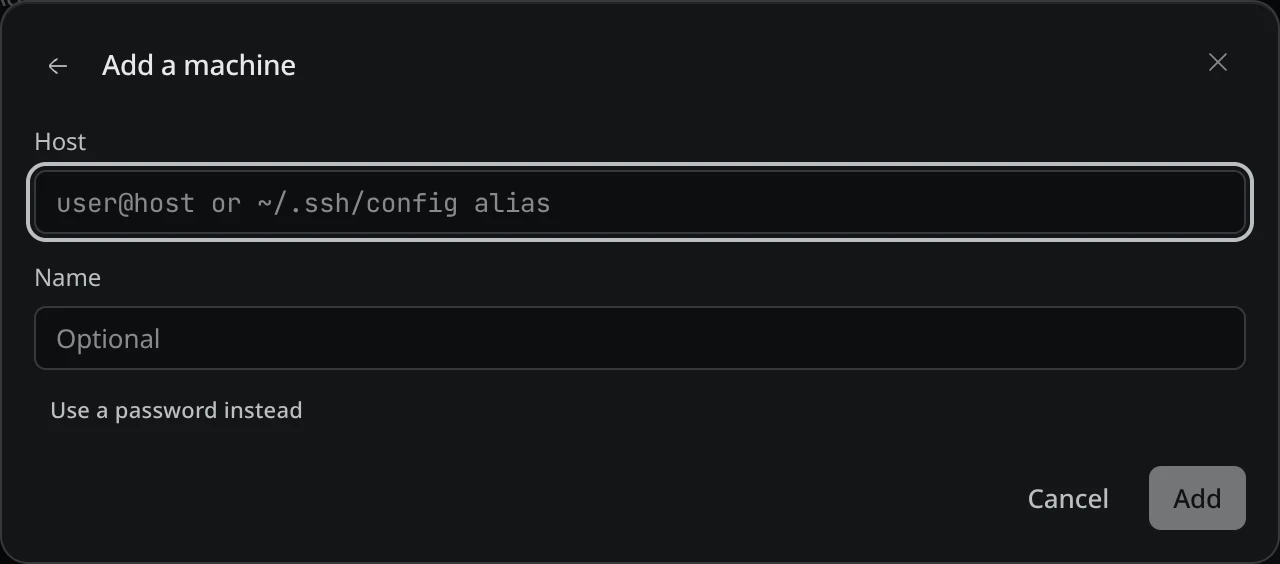
3. Fill in **Host** (`user@host` or an ssh alias) and **Name**.
4. Press **Add**. Hivemind puts its own `hive` on the machine.
Check: the machine shows in the **Machines** pane, not grey.
1. Add it. `hive` puts its own version there:
```bash
hive machine add dev@build-box --label build
```
2. Check it:
```bash
hive machine check build
```
It prints a line like `build: reachable, linux-x86_64, hive 2026.10.6 at /home/dev/.hivemind/bin/2026.10.6/hive`.
 ## Open a folder on it [#open-a-folder-on-it]
1. In the **Machines** pane, press **+** on the machine, or ⋯ → **Open folder here…**.
2. Pick a folder.
Check: it opens as a new frame. Terminals, agents and the Code tile in it all run on the machine.
```bash
hive ctl frame add --machine build --folder /srv/web --name web
hive ctl spawn --frame web --agent claude --prompt "Run the tests and fix what fails"
```
## Check it worked [#check-it-worked]
Run `pwd` in a terminal in the new frame. It prints the folder on the machine.
## Sessions outlive the connection [#sessions-outlive-the-connection]
Terminals and agents on the machine keep running when the network drops, your laptop sleeps or
the app quits, and reattach when you are back. To reach them without the app:
```bash
hive ps --machine build
hive attach --machine build # ctrl-b d detaches
hive run --machine build --cwd /srv/web -- npm test
hive kill --machine build
```
## Nothing to install or update there [#nothing-to-install-or-update-there]
Hivemind keeps `hive` on the machine itself, one copy per version in `~/.hivemind/bin/`. When you
update the app, it puts its new version there the next time it connects, and keeps the two
before it.
## Several people on one login [#several-people-on-one-login]
People who log in to a machine as the same user each get their own terminals there, in
`~/.hivemind/people//`. One person's update never stops another's agents. They are kept
apart, not hidden: anyone on that login can still open the other folders. For privacy, give each
person a login of their own.
## Manage it [#manage-it]
A machine's ⋯ menu in the **Machines** pane has:
| Item | Does |
|---|---|
| **Check now** | Connects again and checks it. |
| **Pause** | Stops connecting. Nothing on the machine stops. **Resume** connects again. |
| **Manage machines…** | Edit it, set its password, or **Remove…** it. |
To be told when an agent there needs you, even with your laptop closed, run this on the machine:
```bash
hive push set https://ntfy.sh/your-topic
hive push test
```
## If it didn't [#if-it-didnt]
| You see | Do |
|---|---|
| The machine is grey | It is paused or unreachable. Press **Check now**. |
| **Sign in** on the machine | It asks for a password. Give it once, or set up an ssh key. |
| **hive could not be put there** | The machine has no `curl` or `wget`, or its disk is full. Fix that and press **Check now**; until then its terminals end when the connection drops. |
| `unsupported remote platform` | Windows cannot be a machine. |
More in [Troubleshooting](https://hivemind.griiken.com/guide/troubleshooting/).
## Good to know [#good-to-know]
- Issues are read from your own computer, not from the machine's folder.
## Related [#related]
- [Keep agents running while your laptop sleeps](https://hivemind.griiken.com/guide/host/): a computer that keeps whole workspaces up, with no desktop.
- [CLI reference](https://hivemind.griiken.com/guide/cli/)
## Open a folder on it [#open-a-folder-on-it]
1. In the **Machines** pane, press **+** on the machine, or ⋯ → **Open folder here…**.
2. Pick a folder.
Check: it opens as a new frame. Terminals, agents and the Code tile in it all run on the machine.
```bash
hive ctl frame add --machine build --folder /srv/web --name web
hive ctl spawn --frame web --agent claude --prompt "Run the tests and fix what fails"
```
## Check it worked [#check-it-worked]
Run `pwd` in a terminal in the new frame. It prints the folder on the machine.
## Sessions outlive the connection [#sessions-outlive-the-connection]
Terminals and agents on the machine keep running when the network drops, your laptop sleeps or
the app quits, and reattach when you are back. To reach them without the app:
```bash
hive ps --machine build
hive attach --machine build # ctrl-b d detaches
hive run --machine build --cwd /srv/web -- npm test
hive kill --machine build
```
## Nothing to install or update there [#nothing-to-install-or-update-there]
Hivemind keeps `hive` on the machine itself, one copy per version in `~/.hivemind/bin/`. When you
update the app, it puts its new version there the next time it connects, and keeps the two
before it.
## Several people on one login [#several-people-on-one-login]
People who log in to a machine as the same user each get their own terminals there, in
`~/.hivemind/people//`. One person's update never stops another's agents. They are kept
apart, not hidden: anyone on that login can still open the other folders. For privacy, give each
person a login of their own.
## Manage it [#manage-it]
A machine's ⋯ menu in the **Machines** pane has:
| Item | Does |
|---|---|
| **Check now** | Connects again and checks it. |
| **Pause** | Stops connecting. Nothing on the machine stops. **Resume** connects again. |
| **Manage machines…** | Edit it, set its password, or **Remove…** it. |
To be told when an agent there needs you, even with your laptop closed, run this on the machine:
```bash
hive push set https://ntfy.sh/your-topic
hive push test
```
## If it didn't [#if-it-didnt]
| You see | Do |
|---|---|
| The machine is grey | It is paused or unreachable. Press **Check now**. |
| **Sign in** on the machine | It asks for a password. Give it once, or set up an ssh key. |
| **hive could not be put there** | The machine has no `curl` or `wget`, or its disk is full. Fix that and press **Check now**; until then its terminals end when the connection drops. |
| `unsupported remote platform` | Windows cannot be a machine. |
More in [Troubleshooting](https://hivemind.griiken.com/guide/troubleshooting/).
## Good to know [#good-to-know]
- Issues are read from your own computer, not from the machine's folder.
## Related [#related]
- [Keep agents running while your laptop sleeps](https://hivemind.griiken.com/guide/host/): a computer that keeps whole workspaces up, with no desktop.
- [CLI reference](https://hivemind.griiken.com/guide/cli/)