# Make an API token
> Make a token so one of your programs can drive a workspace, choose its role, and revoke it when you are done.
Source: https://hivemind.griiken.com/guide/api-tokens/
Make a token when a program of yours should drive a workspace: a dashboard, a script, an orchestrator.
{`
Make a Hivemind API token for one of my programs, at the smallest role it needs, and store it safely.
1. Ask me what the program is called, which workspace folder it drives, and what it does. Choose the role from that: \`view\` only reads; \`edit\` also presses widgets and opens tool tiles; \`terminals\` also types into terminals; \`agents\` also starts, answers and closes agents. Tell me the role you chose and why.
2. Check Hivemind runs with that folder open: \`hive ctl agents\` must not exit 3. If it does, ask me to open the folder with \`hivemind \`.
3. Make it, with an expiry unless I ask otherwise: \`hive grant create -w --role --expires 30d --json\`. The output holds \`token\` (shown only this once) and \`socket\`.
4. Never show the token in this chat and never put it in a file git tracks. Write it to a git-ignored \`.env\` beside the program as \`HIVE_DRIVE_TOKEN=…\`, with \`HIVE_DRIVE_SOCK=\` and \`HIVE_WORKSPACE=\`. Check \`git check-ignore .env\` confirms it is ignored; add it to \`.gitignore\` if not.
5. Check it works: with those variables loaded, \`hive ctl agents --json\` prints the workspace's agents.
At the end, tell me the token's id and role from \`hive grant list\`, where the token is stored, and that \`hive grant revoke \` takes it back.
`}
## Before you start [#before-you-start]
- Hivemind is running with the workspace open, or `hive host` serves it.
- You know what the program does, so you can pick the smallest role. See [Choose a role](#choose-a-role).
## Make the token [#make-the-token]
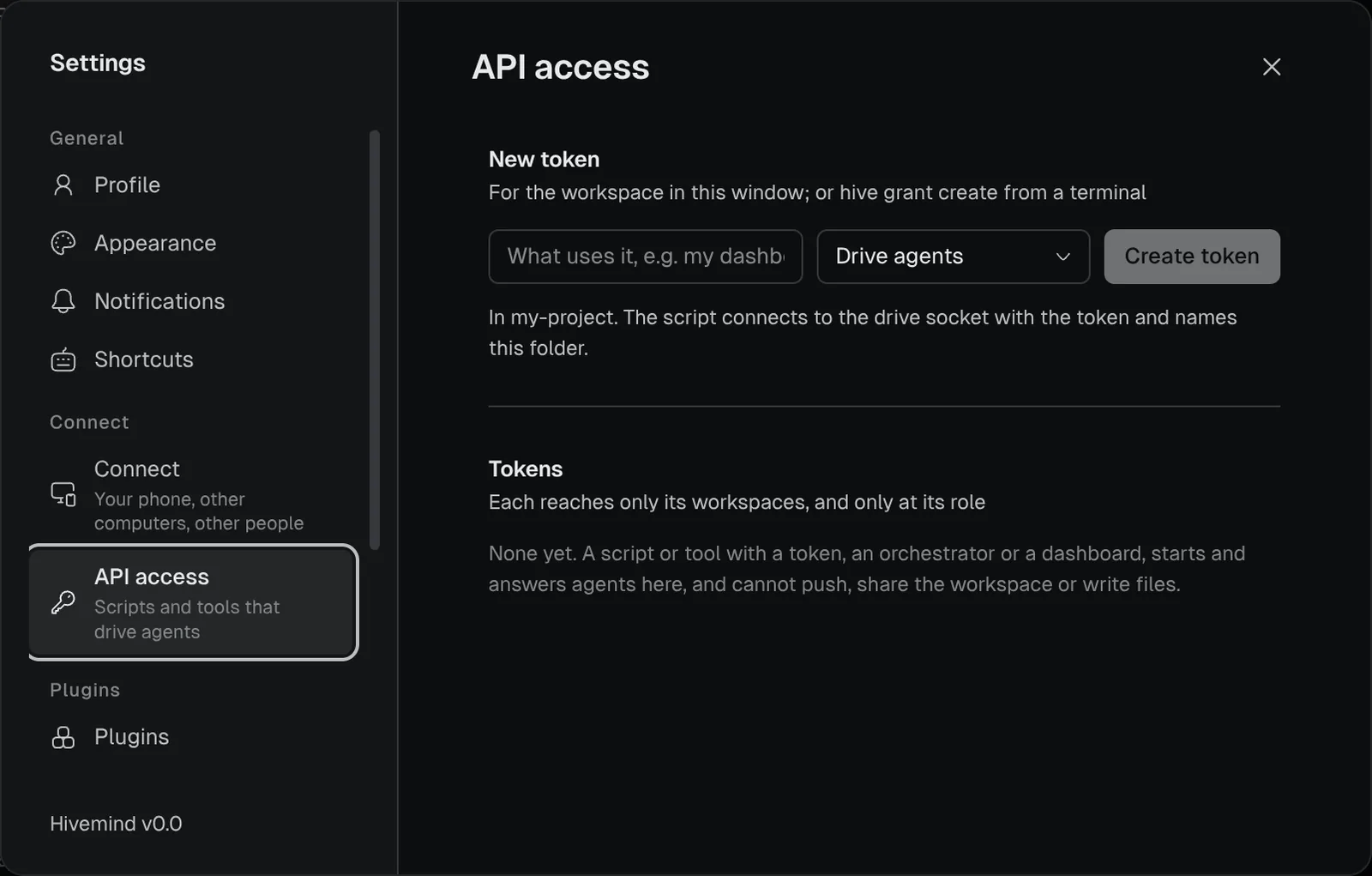
Open the workspace, then **Settings → API access**.
Under **New token**, name what uses it, for example *my dashboard*. Pick what it may do.
Press **Create token**, then **Copy**. The token is shown this once.
A token made in Settings reaches the workspace in that window and never expires.
To make a read-only token that lasts 30 days, run:
```bash
hive grant create dashboard -w ~/work/api --role view --expires 30d
```
It prints the token first, shown once (long lines wrapped here):
```text
hgr_…
dashboard may view in api, until 2026-11-17T09:00:00Z
(`hive grant revoke 1a2b3c4d5e6f`).
It connects to ~/.config/hivemind/drive.sock and says
{"hello": {"token": "", "workspace": ""}}.
```
| Option | Means |
|---|---|
| `` | What the program is called. It shows in the token list and the audit log. |
| `-w`, `--workspace` | A workspace it may drive: its folder, name or id. Repeat it for more. |
| `--role` | `view`, `edit`, `terminals` or `agents`. Without it, `agents`. |
| `--expires` | How long it lasts: `12h`, `30d`. Without it, until you revoke it. |
| `--json` | Prints `{grant, token, socket}`. |
Hivemind keeps only a hash of each token. A lost token cannot be shown again, so make a new one.
 ## Choose a role [#choose-a-role]
Each role can do everything the roles above it can. People and programs get the same four roles.
| Role | For a person, the app says | For a token, **API access** says | Can |
|---|---|---|---|
| `view` | **Can view** | **View** | see the canvas, terminals, agents and their replies, files, diffs, issues and review comments |
| `edit` | **Can edit board** | **Edit** | also move, add and close tiles, press widgets, open a tool's tile |
| `terminals` | **Can use terminals** | **Use terminals** | also type into terminals (a person once given the keyboard) |
| `agents` | **Can drive agents** | **Drive agents** | also start, answer, message, put to sleep and close agents, which means running commands on your computer. A person gets it only while they are here, after a warning. |
A dashboard needs `view`; an orchestrator that starts agents needs `agents`. A call the role does not allow is answered `FORBIDDEN` and never runs. The full list is on [Methods by role](https://hivemind.griiken.com/guide/api-methods/).
## Check it worked [#check-it-worked]
To see your tokens, run:
```bash
hive grant list
```
```text
1a2b3c4d5e6f dashboard view /home/you/work/api expires 2026-11-17T09:00:00Z last used never
```
**Settings → API access** shows the same list, with when each token was last used.
## Revoke a token [#revoke-a-token]
Press **Revoke** in **Settings → API access**, or run it with the id from `hive grant list`:
```bash
hive grant revoke 1a2b3c4d5e6f
```
Revoking closes the program's connections at once. An expired token closes them at that moment too.
## If it didn't work [#if-it-didnt-work]
| What you see | Fix |
|---|---|
| `hive ctl` exits 3 | Neither the app nor `hive host` is running. Open the workspace with `hivemind `. |
| `FORBIDDEN` on hello | The token is wrong, revoked or expired, or does not reach that workspace. Make a new one. |
| `BAD_REQUEST` on hello | Name the workspace's folder, and open it in the app first. |
More in [Troubleshooting](https://hivemind.griiken.com/guide/troubleshooting/).
## Related [#related]
- [API overview](https://hivemind.griiken.com/guide/api/): how tokens and roles fit together.
- [Connect and call](https://hivemind.griiken.com/guide/api-connect/): use the token from a program.
## Choose a role [#choose-a-role]
Each role can do everything the roles above it can. People and programs get the same four roles.
| Role | For a person, the app says | For a token, **API access** says | Can |
|---|---|---|---|
| `view` | **Can view** | **View** | see the canvas, terminals, agents and their replies, files, diffs, issues and review comments |
| `edit` | **Can edit board** | **Edit** | also move, add and close tiles, press widgets, open a tool's tile |
| `terminals` | **Can use terminals** | **Use terminals** | also type into terminals (a person once given the keyboard) |
| `agents` | **Can drive agents** | **Drive agents** | also start, answer, message, put to sleep and close agents, which means running commands on your computer. A person gets it only while they are here, after a warning. |
A dashboard needs `view`; an orchestrator that starts agents needs `agents`. A call the role does not allow is answered `FORBIDDEN` and never runs. The full list is on [Methods by role](https://hivemind.griiken.com/guide/api-methods/).
## Check it worked [#check-it-worked]
To see your tokens, run:
```bash
hive grant list
```
```text
1a2b3c4d5e6f dashboard view /home/you/work/api expires 2026-11-17T09:00:00Z last used never
```
**Settings → API access** shows the same list, with when each token was last used.
## Revoke a token [#revoke-a-token]
Press **Revoke** in **Settings → API access**, or run it with the id from `hive grant list`:
```bash
hive grant revoke 1a2b3c4d5e6f
```
Revoking closes the program's connections at once. An expired token closes them at that moment too.
## If it didn't work [#if-it-didnt-work]
| What you see | Fix |
|---|---|
| `hive ctl` exits 3 | Neither the app nor `hive host` is running. Open the workspace with `hivemind `. |
| `FORBIDDEN` on hello | The token is wrong, revoked or expired, or does not reach that workspace. Make a new one. |
| `BAD_REQUEST` on hello | Name the workspace's folder, and open it in the app first. |
More in [Troubleshooting](https://hivemind.griiken.com/guide/troubleshooting/).
## Related [#related]
- [API overview](https://hivemind.griiken.com/guide/api/): how tokens and roles fit together.
- [Connect and call](https://hivemind.griiken.com/guide/api-connect/): use the token from a program.